🚀 Mastering Basic Git & GitHub for DevOps Engineers 🐙
DevOps Enthusiast | Hashnode Blogger | Software Delivery Explorer
Introduction:
Hello fellow DevOps enthusiasts! In today's blog post, we'll embark on an exciting journey into the world of Git and GitHub. 🎉 Whether you're a seasoned developer or a DevOps engineer, understanding these essential tools is crucial for collaboration, version control, and efficient software development.
What is Git? 📜
Git is a distributed version control system that allows developers to track changes in their codebase efficiently. It was created by Linus Torvalds in 2005 and has since become the industry standard for managing projects, both large and small. Git enables teams to work simultaneously on the same codebase without conflicts and provides a robust history of changes.
🎯 Basic Git Commands 🎯
git init 🏁
Initialize a new Git repository in your project directory.
git add <file(s)> ➕
Add file(s) to the staging area to prepare them for a commit.
git commit -m "Your commit message here" 📝
Create a new commit with changes from the staging area.
git status 📊
Check the current status of your working directory and staging area.
git clone <repository-url> 📥
Clone a remote repository to your local machine.
git pull 🔄
Fetch and merge changes from the remote repository to your local branch.
git push 📤
Upload your local commits to the remote repository.
git branch 🌳
List all branches in the repository, indicating the current branch.
git checkout <branch-name> ⚙️
Switch to a different branch.
git merge <branch-name> 🤝
Merge changes from another branch into the current branch.
git log 📜
Display the commit history.
git reset <commit> 🔙
Undo changes to a specific commit while keeping the changes in the working directory.
📜 What is Version Control? 🔄
Version control, also known as source control or revision control, is a system that tracks changes to files over time. It maintains a historical record of modifications made to the source code, documents, or any other files in a project.
Types of Version Control Systems:
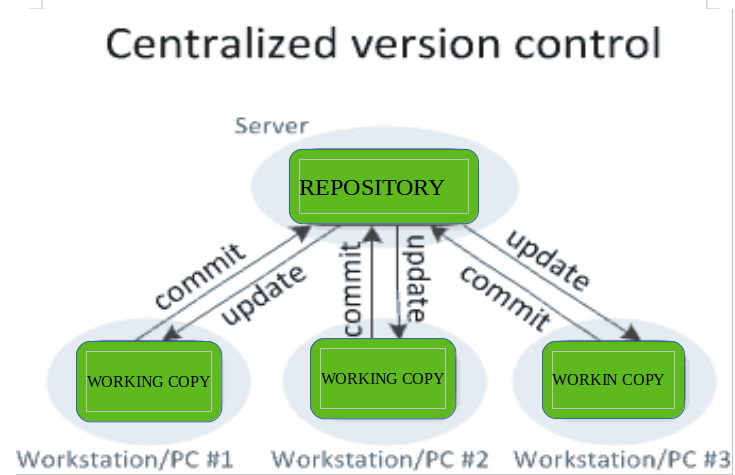
Centralized Version Control Systems (CVCS):
In CVCS, there is a central server that stores the entire history of the project. Developers check out files from this central repository to work on them locally. Changes are made and then committed back to the central server. Examples of CVCS include Subversion (SVN) and Perforce.
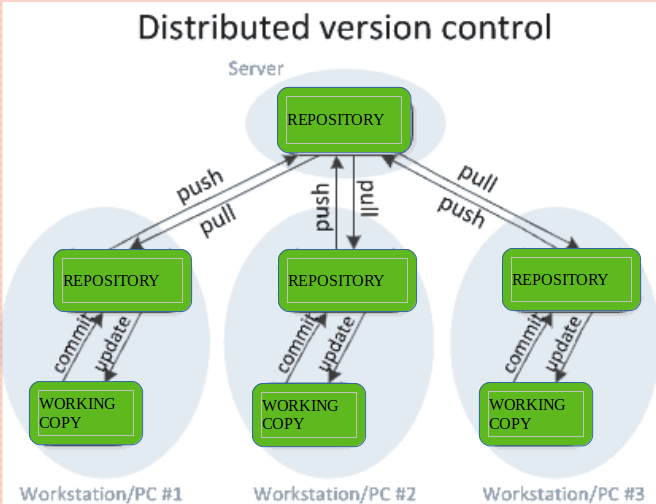
Distributed Version Control Systems (DVCS):
DVCS takes a decentralized approach, where every developer has a complete copy of the repository, including its history, on their local machine. This enables developers to work offline, commit changes locally, and share their changes with others only when ready. Git and Mercurial are examples of DVCS.
What is Github?
GitHub is a web-based platform that provides hosting services for software development projects using the Git version control system. It was founded in 2008 by Chris Wanstrath, Tom Preston-Werner, Scott Chacon, and PJ Hyett, and has since become a cornerstone of the software development community. GitHub offers a wide range of features that make it a powerful tool for developers and teams worldwide.
Task 1. Create a new repository on GitHub and clone it into your local machine.
To create a repository:
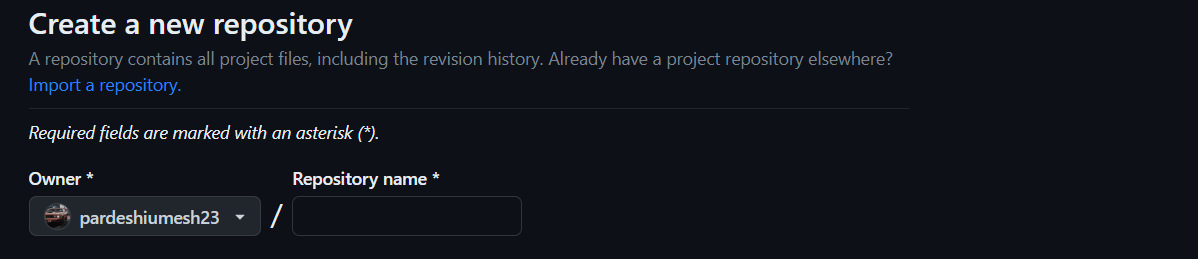
To clone it into your local machine:

Task 2. Make some changes to a file in the repository and commit them to the repository using Git

Task 3. Push the changes back to the repository on GitHub

Set your user name and email address, which will be associated with your commits.

Conclusion:
In conclusion, Git and GitHub form the backbone of modern software development, and mastering these tools is essential for DevOps engineers. Git's powerful version control capabilities allow for efficient code management, collaboration, and history tracking. GitHub, as a collaborative platform, provides a hub for developers to share, review, and contribute to projects seamlessly.